

Adobe Business Intelligence Analyst Interview Guide (2025)


Introduction
Preparing for an Adobe business intelligence analyst interview means stepping into a role that sits at the intersection of data engineering, visualization, and strategy. Adobe operates some of the largest datasets in tech, and business intelligence analysts are trusted to transform that raw information into clear insights that power product, marketing, and financial decisions.
In this guide, we’ll break down what the Adobe business intelligence analyst role looks like day-to-day, highlight the culture that encourages experimentation and inclusivity, and explain how BI teams contribute to billion-dollar product strategies. We’ll also cover the interview process, common Adobe business intelligence questions, and preparation strategies to stand out. Whether you’re coming from analytics, consulting, or engineering, this role offers the chance to shape decisions at scale.
Role Overview & Culture
The Adobe business intelligence analyst role revolves around building scalable dashboards, ensuring KPI alignment, and creating data models that support decision-making across Creative Cloud and Experience Cloud. Analysts regularly collaborate with product leaders, finance teams, and marketers to turn data into stories that highlight opportunities, risks, and growth trends. Working alongside engineers, they ensure pipelines remain accurate and reliable while enabling stakeholders with self-service tools that foster better decisions.
Culturally, Adobe champions its “Adobe For All” values, where inclusivity and autonomy go hand in hand. BI analysts are empowered to experiment with new tools, refine reporting frameworks, and influence strategy through evidence-based recommendations. The environment rewards curiosity, precision, and a willingness to bridge technical depth with executive clarity.
Why This Role at Adobe?
The Adobe business intelligence analyst role stands out because of its direct impact on billion-dollar product strategies and the breadth of data access. BI analysts work with some of the most advanced tech stacks in the industry, gaining visibility into how Creative Cloud and Experience Cloud products scale globally. Compensation is highly competitive, and Adobe offers a structured career ladder that enables growth into senior BI, product analytics, or data science roles.
For professionals eager to apply business intelligence at a global scale, this position combines technical challenge with strategic influence. Understanding what the interview process looks like for a business intelligence analyst at Adobe is the next step toward joining this insight-driven team.
What Is the Interview Process Like for a Business Intelligence Analyst Role at Adobe?
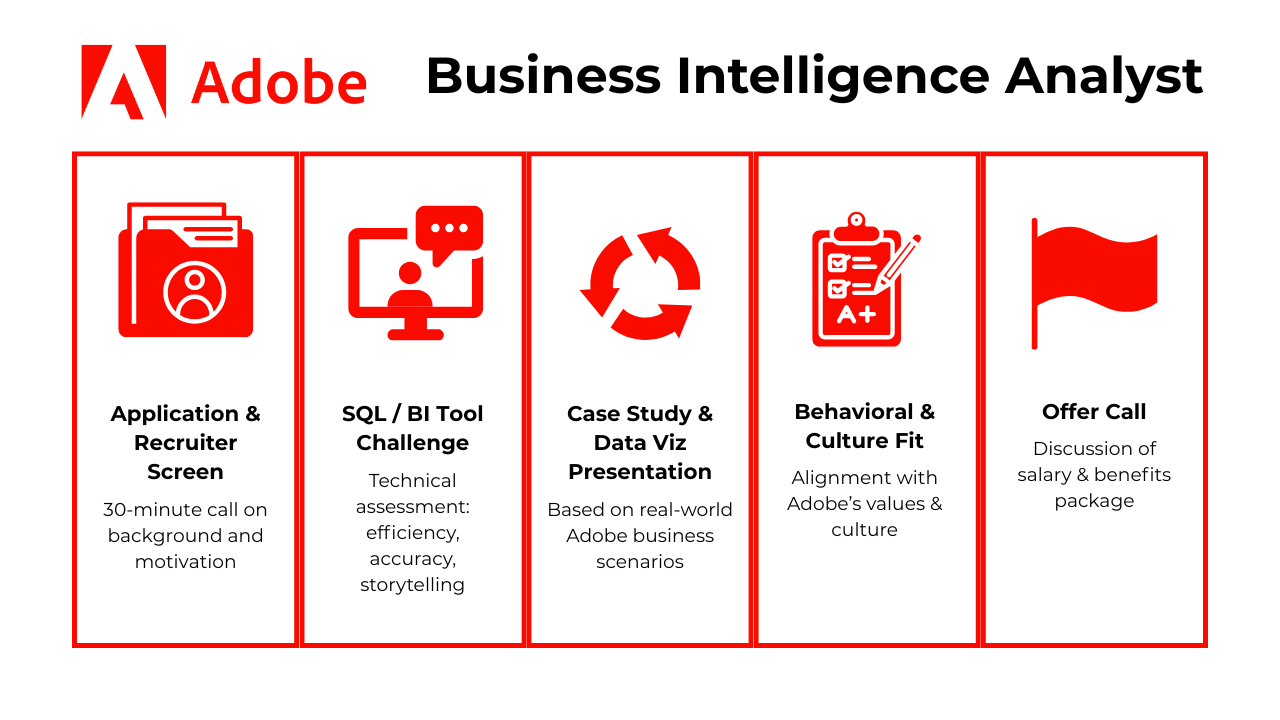
The Adobe Business Intelligence Analyst interview process is structured to evaluate both your technical skills and your ability to translate data into strategic insight. You’ll go through several rounds that assess dashboarding fluency, stakeholder communication, and alignment with Adobe’s values. Each stage is crafted to mirror real work scenarios you’d encounter on the job.
Application & Recruiter Screen
The process kicks off with a 30-minute screening call led by a recruiter. You’ll discuss your background, interest in Adobe, and familiarity with BI tools like Tableau, Power BI, or Looker. Recruiters may also probe your exposure to SQL, experience delivering insights to non-technical stakeholders, and interest in Adobe’s products like Creative Cloud or Experience Cloud. This is your opportunity to position yourself as someone who not only understands the tools but also the impact BI can have on customer experience and growth.
Tip: Go beyond listing tools. Share a quick story of how you used data to influence a business decision. Adobe recruiters listen for impact, not just keywords.
SQL/BI Tool Challenge
Next comes the technical assessment. You may be asked to write SQL queries that analyze feature adoption, customer churn, or campaign performance, or to build a dashboard that highlights KPIs for a marketing or product team. This stage tests your ability to balance query efficiency, data accuracy, and storytelling in visualizations. Strong candidates explain their thought process, including how they handle edge cases, validate results, and ensure dashboards are actionable rather than just pretty.
Tip: Always annotate or comment your SQL. Adobe reviewers appreciate candidates who show clarity of thought. It mirrors how analysts document for cross-functional partners.
Case Study & Data Visualization Presentation
You’ll present a case study based on a realistic Adobe scenario, such as evaluating why churn spiked in Creative Cloud, or measuring ROI on a global marketing campaign. You’ll be expected to prepare visuals (Tableau, Power BI, or Looker) and deliver them as though pitching to executives or product leaders. This round evaluates your structured thinking, ability to craft a narrative, and skill in tailoring detail to your audience.
Tip: Tie your case recommendations back to Adobe’s mission of Creativity for All. When you frame BI insights in terms of helping creators succeed, you stand out as strategically aligned. For dashboard challenges, here are the top 25 data visualization interview questions to help you prep on Interview Query.
Behavioral & Culture-Fit Round
This stage explores whether your values align with Adobe’s. Expect questions about handling ambiguity, collaborating across functions, and driving decisions through data. You may be asked about a time you influenced without authority or advocated for inclusive practices in analysis or communication. Adobe seeks analysts who are empathetic, collaborative, and adaptable to rapid change in matrixed environments.
Tip: Swap generic “users” language for “creators” or “customers” when sharing stories. It mirrors Adobe’s vocabulary and demonstrates cultural awareness.
Offer Call
If successful, you’ll receive an offer call outlining your base salary, performance bonus eligibility, and equity or benefits. Recruiters will explain how leveling works, team placement, and opportunities for mobility into senior BI, data science, or product analytics tracks. Adobe emphasizes long-term career growth, with training and wellness perks built into compensation.
Tip: Mentioning interest in growing across teams signals commitment and curiosity, which recruiters flag positively.
Behind the Scenes
Interviewers score independently and then convene in a hiring panel to discuss results. A bar-raiser (neutral interviewer from outside the team) may be included to ensure fairness and culture alignment. Adobe values transparency: most candidates hear back within 3–5 business days, though timing can vary. In addition to technical results, interviewers weigh how well you communicated business impact, collaborated in scenarios, and showed customer empathy.
Tip: Don’t over-index on technical perfection. Adobe’s panels give as much weight to how you frame insights and engage stakeholders as to the SQL syntax itself.
Differences by Level
Expectations differ by seniority. Entry-level analysts are evaluated primarily on SQL fundamentals, KPI interpretation, and clean, simple dashboards. Mid-level candidates are expected to connect insights to strategic priorities and influence stakeholders. Senior candidates may lead scenario planning, critique KPI frameworks, or propose a BI roadmap that supports Adobe’s multi-cloud strategy. The higher the level, the more emphasis on business impact and leadership rather than just technical execution.
Tip: Calibrate your examples to your level. Entry-level? Showcase clarity and precision. Senior? Focus on vision, influence, and shaping strategy at scale.
Challenge
Check your skills...
How prepared are you for working as a Business Intelligence at Adobe?
What Questions Are Asked in an Adobe Business Intelligence Analyst Interview?
Coding/Technical Questions
Expect advanced SQL and dashboard‑logic prompts in this section. These Adobe business intelligence problems test how well you manipulate data, design reporting logic, and construct KPIs using SQL.
Retrieve the largest salary for each department
This type of ranking problem often appears because it mirrors how BI analysts need to identify “top performers” in a dataset, whether that’s a highest-paying customer, most popular product, or, in this case, the largest salary per department. You would typically solve this by partitioning rows by department and applying ranking functions like
ROW_NUMBER()orRANK(). Tie handling is an important nuance, since real datasets often include multiple employees at the same maximum salary.Tip: Adobe interviewers expect you to mention performance. Highlight how you’d index or filter large HR or payroll datasets to keep queries efficient.
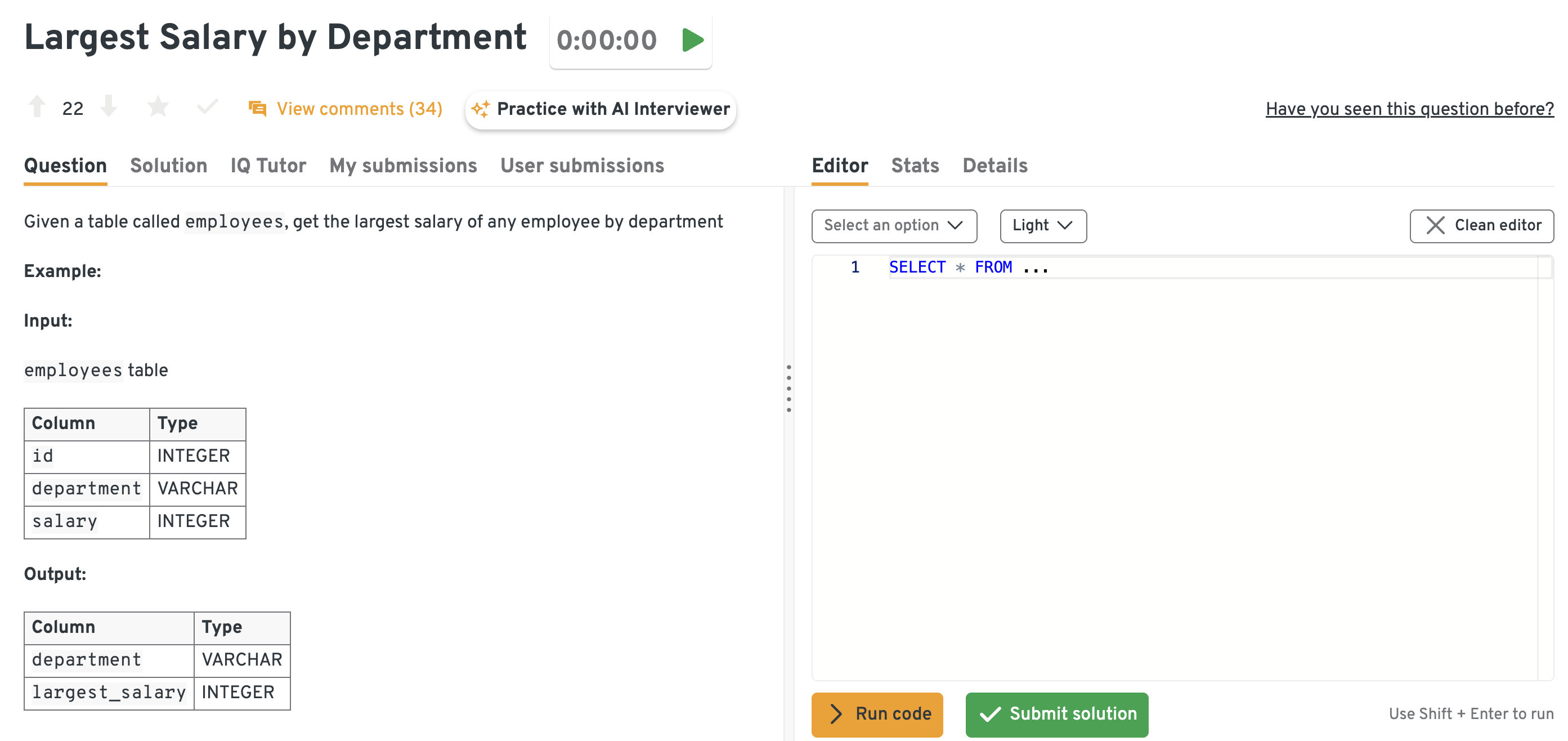
You can solve this question on Interview Query dashboard. This dashboard presents a practice SQL problem where you’re asked to find the largest salary by department. It includes the problem statement, schema details, expected output format, and an SQL editor for writing and testing queries. You can use it to practice real interview-style problems, compare your solution against others, and build fluency with common SQL patterns like grouping and aggregation. This kind of setup mirrors the pressure and structure of actual interviews, making it an effective prep tool.
Write a query to pivot a table of monthly sales into columns
Pivoting tests whether you can reformat datasets into structures that business users expect in dashboards. Instead of raw transactional rows, teams often want months as columns with totals displayed neatly. You could achieve this using conditional aggregation (
CASE WHEN) or platform-specific pivot functions, ensuring you handle nulls for missing months. This mimics common Adobe reporting needs—like turning Creative Cloud license activations into monthly cohorts for executives.Tip: When discussing pivoting, call out how you’d adapt solutions depending on SQL dialect. Adobe uses both cloud data warehouses and traditional RDBMSs. You can read this article to optimize your CASE WHEN in SQL and avoid any common errors.
Design an end-to-end architecture for international e-commerce fulfillment
This system-level question goes beyond SQL syntax to test whether you understand the broader flow of data. Imagine Adobe running an international subscription hardware bundle. So your architecture must consider orders, customs, warehouse synchronization, payments, and tracking. You should highlight distributed databases for reliability, failover strategies, and latency trade-offs. This is where analysts demonstrate not just querying skills but also their understanding of how BI fits into operational systems.
Tip: Frame your solution in terms of user experience. Adobe values analysts who connect backend design decisions to customer trust and speed of delivery.
Write a query to get the distribution of total notifications per user
Here you’re asked to compute second-level aggregations: first group by user to count notifications, then group again by those counts to see how many users fall into each “bucket.” It’s a practical engagement-tracking question because notification frequency directly affects user behavior. For Adobe, this could map to Creative Cloud updates or marketing pushes, where too many notifications might harm user retention.
Tip: Go one step further. Mention how you’d visualize the distribution (e.g., histogram or percentile breakdown) to help stakeholders immediately interpret your output.
System / Product Design Questions
These questions explore how you architect scalable dashboards, pipelines, and BI ecosystems to support Adobe’s growing portfolio of creative and marketing tools.
Design a database for a file storage company to serve user upload/download patterns
The expectation here is that you’ll structure tables for users, files, permissions, and version history, balancing normalization with performance. Because file systems involve both heavy writes (uploads) and frequent reads (downloads), you should discuss trade-offs like denormalization or caching. For Adobe, this is relevant to Creative Cloud storage, where millions of assets must be accessible globally with minimal latency.
Tip: Mention how you’d monitor access patterns over time. Adobe appreciates answers that show awareness of both design and ongoing optimization.
Create a new
production_companiestable from embedded JSON in a raw datasetThis question evaluates your ability to transform semi-structured data into relational form. You’ll need to parse JSON, extract nested objects, and flatten them into a normalized table. The interviewer wants to see if you can balance flexibility for future schema changes with the performance needs of BI pipelines. This skill is highly relevant when Adobe ingests raw event data from multiple product logs.
Tip: Emphasize error handling. Explain how you’d deal with malformed JSON or missing fields to keep pipelines resilient.
Design a cost-effective data analytics solution to process clickstream events
Clickstream data powers real-time analytics in Adobe Experience Cloud. In this scenario, you’d describe ingestion through Kafka or Kinesis, storage in a cloud lake like S3, and querying through Redshift, Presto, or BigQuery. The focus is on balancing cost efficiency with timeliness: should you process all events in real-time or use a hybrid of streaming and batch? Adobe interviewers look for nuanced trade-off reasoning.
Tip: Explicitly tie your design to Adobe products. For example, “Real-time segmentation supports Adobe RT-CDP customers running personalized campaigns.”
Design an ETL pipeline to collect and aggregate unstructured feedback from surveys and NPS forms
Here, you’re tested on working with unstructured or text data. The ideal answer involves parsing free-text fields, tagging or classifying responses, and feeding structured summaries into dashboards. You should mention NLP for categorization, deduplication to prevent double-counting, and validation for accuracy. For Adobe, this aligns with its emphasis on customer feedback to drive roadmap decisions.
Tip: Show that you’d involve stakeholders early. Ask PMs or customer success what “themes” matter most before designing the pipeline.
How would you build a daily KPI dashboard for Adobe Creative Cloud usage?
This is the most role-specific question. Define KPIs like daily active users, license activations, and feature adoption, and explain how you’d structure raw logs, aggregate them into fact tables, and feed them into BI tools. Scalability and performance matter—you should describe how you’d partition data by geography or product line. Ultimately, the interviewer wants to see that you can translate logs into a narrative that executives and PMs can act on.
Tip: Tie your answer back to impact. Say explicitly how monitoring DAU trends helps Adobe catch retention issues early and prioritize fixes. If you want to practice more similar questions, here are top 12 business intelligence case studies to ace your interview.
Behavioral or Culture‑Fit Questions
These questions assess your alignment with Adobe’s values by evaluating how you communicate insights effectively, manage cross-team expectations, and deliver impact through data, even without direct authority.
Tell me about a time when your insight changed the direction of a product or feature.
Use the STAR method to explain your initial analysis, how you uncovered the insight, and what happened next. Emphasize how you framed the insight to make it actionable for non-technical stakeholders. Describe the business or product impact. This shows your ability to drive decision-making as a Business Intelligence Analyst.
Example: In a previous role, I observed a sharp drop in engagement after the second step in a sign-up funnel. My analysis showed that a required field was causing form abandonment. I presented the data with visual heatmaps and explained the revenue impact in terms the product team could act on. Based on this insight, the form was simplified, reducing abandonment by 18% and boosting conversions.
Tip: At Adobe, always frame insights as creator-centric outcomes, showing how a change empowers users or improves creative workflows, to make your recommendations resonate more strongly.
Describe a time when you collaborated across teams to deliver a dashboard or report.
Focus on how you gathered diverse requirements, negotiated priorities, and kept stakeholders aligned. Highlight tools or communication channels used, such as Jira, Slack, or sprint reviews. Mention the value of the final deliverable. Demonstrates how you build trust and clarity in Adobe’s cross-functional environments.
Example: I led a project to create a unified marketing performance dashboard for product and sales teams. The challenge was that each team wanted different KPIs. I facilitated a requirements workshop, prioritized shared metrics, and built a layered dashboard where teams could filter for their own needs. By launch, both groups used it weekly, cutting reporting time by 40% and improving campaign alignment.
Tip: Adobe values BI analysts who don’t just “deliver dashboards” but create living tools that multiple teams adopt. Always emphasize stakeholder adoption as part of success.
Tell me about a time you had to revise a deliverable after receiving critical feedback.
Walk through how you handled the feedback professionally and iterated quickly. Mention how you prioritized feedback and balanced business vs. technical constraints. Reflect on what you learned. Shows humility and iterative delivery, which are essential in Adobe business intelligence roles.
Example: I once built a churn analysis report that was too detailed for executives. They said it buried the key message. Instead of being defensive, I stripped it down to three visuals with clear commentary and sent a new draft within 48 hours. The revised version was later presented in a board meeting. I learned to tailor the level of detail to the audience’s needs.
Tip: Adobe interviewers look for adaptability. Stress how you incorporate feedback without losing momentum or confidence in your work.
Give an example of a time when a dashboard you built failed to deliver the expected impact. What did you learn?
Talk about metrics that didn’t get used, misalignment with business goals, or a communication gap. Emphasize how you discovered the issue and how you responded. Finish with a takeaway about stakeholder alignment. Adobe looks for analysts who can course-correct quickly and learn fast.
Example: I built a feature adoption dashboard for product managers, but adoption was low. In follow-ups, I learned the metrics didn’t align with how they measured success. I regrouped with PMs, added relevant metrics, and re-trained them on usage. Adoption rose from two to eight PMs within a month. This taught me that early stakeholder involvement is just as important as technical execution.
Tip: Adobe emphasizes iterative delivery. Show that you see “failure” as feedback and know how to adjust for stakeholder relevance.
Describe a situation where a stakeholder requested a KPI you knew was misleading.
Explain how you clarified the request, provided alternatives, and educated the stakeholder on the risks. Emphasize diplomacy and clarity. Include how you maintained trust in the conversation. Highlights integrity and analytical judgment.
Example: A marketing lead once asked for “average revenue per user” as a success KPI. I explained that it could be misleading due to outliers and proposed using median revenue and retention by cohort instead. I shared examples showing how averages distorted the trend. The stakeholder agreed, and the final KPI framework gave a more accurate view of campaign performance. Trust grew because I addressed their goals while offering a better alternative.
Tip: Adobe prizes integrity in data storytelling. Show that you can diplomatically protect data accuracy while keeping stakeholders engaged and confident.
How to Prepare for a Business Intelligence Analyst Interview at Adobe
Landing an Adobe Business Intelligence Analyst role requires more than just technical fluency—you’ll need to showcase sharp business intuition, strong storytelling, and alignment with Adobe’s collaborative and experimental culture. Below are five targeted strategies to help you succeed at each stage of the interview loop.
Recreate a Creative Cloud Usage Dashboard
One of the most effective ways to prepare for Adobe’s BI interview is to simulate the type of dashboard you’d be expected to build on the job. Use public datasets related to software usage, subscription trends, or digital engagement, and re-create a dashboard that mirrors how a Creative Cloud PM might monitor user behavior. Include KPIs like daily active users, license activations, and retention cohorts, while paying attention to interactivity and drill-down functionality. The goal isn’t just to show technical fluency in Tableau, Power BI, or Looker but also to demonstrate how you’d interpret patterns for marketing or product stakeholders.
Tip: When presenting your mock dashboard, frame every insight in terms of how it impacts “creators” or “customers”. Adobe interviewers respond well when candidates tie metrics directly to end-user outcomes.
Drill 10 SQL Joins & CTE Challenges
Adobe’s technical screen often includes queries with multiple joins, aggregations, and window functions. Practice common patterns using LeetCode, Mode Analytics, or Interview Query’s BI prep section, especially those involving time-series metrics or funnel stages.
Practice Explaining to Non-Technical Stakeholders
Pick a metric like “Net Revenue Retention” or “Feature Adoption Rate” and explain it simply—what it is, why it matters, and how it influences decisions. Adobe values analysts who can bridge technical depth with business clarity, especially in cross-functional meetings. Here are top 33 business intelligence interview questions to help you prepare.
Mock Present A Data-Story Deck
Take a past project or mock case (e.g., churn reduction, campaign ROI) and walk through it as if presenting to a marketing VP. Focus on narrative flow, visual hierarchy, and anticipating stakeholder questions. Adobe expects clear, visual, and actionable insights, not just charts. You can schedule a mock interview to get tailored feedback from industry professionals.
Study Adobe’s Earnings Slides
Review Adobe’s Investor Relations presentations to understand revenue breakdowns, growth priorities (e.g., GenAI, Experience Cloud), and key metrics. Referencing real business context during your case or behavioral interviews shows maturity and product awareness.
FAQs
What is the Average Salary for an Adobe Business Intelligence Analyst?
Average Base Salary
Average Total Compensation
The Adobe business intelligence analyst salary in the U.S. varies by level. Here’s a full breakdown:
- Overall: Total compensation ranges from $112K-$163K per year, with a median of $135K, consisting of 82.1% of base salary, 6% of bonus, and 11.9% of stock.
- Associate Level: For associate level, the total compensation is around $145K.
- Senior Level: Senior business intelligence analyst has a total compensation of $188K, with $147K of base salary, $24.4K stock, and $17.3K bonus.
Are there job postings for Adobe business intelligence analyst roles on Interview Query?
Yes! See the latest openings and get insider tips from our Jobs Board. You will also see roles across top tech companies. The postings are integrated directly into the dashboard, giving you a single place to track opportunities without jumping across multiple platforms. You can quickly filter by role, company, or location to focus on what matters most, while also comparing openings across different firms. This makes job searching more efficient and organized, helping you stay on top of the most relevant positions.
What does an Adobe business intelligence analyst do?
At Adobe, business intelligence (BI) analysts build and maintain dashboards, analyze customer and product data, and provide insights that guide marketing, product, and finance decisions. They often partner with product managers and executives to translate raw data into strategic recommendations.
What do I need to become a business intelligence analyst at Adobe?
Most Adobe BI analysts hold a degree in business analytics, data science, or a related field. Proficiency in SQL, Tableau/Power BI, and statistical analysis is essential, along with strong communication skills for explaining insights to non-technical stakeholders. You can read more about the business intelligence career path on Interview Query.
Can I make 100k as a business analyst?
Yes. At Adobe, entry-level BI analysts often start around $112K, depending on location, with mid-career professionals exceeding $150K in base salary. Total compensation can be higher with performance bonuses and equity.
What is the career trajectory of a business intelligence analyst at Adobe?
Analysts typically move into senior BI analyst roles within 2–3 years, followed by BI manager or analytics lead positions. From there, growth paths include product analytics leadership, data science, or strategy roles across Adobe’s business units.
What accounts for an ideal business intelligence analyst profile?
Adobe looks for candidates with a mix of technical expertise (SQL, Python/R, BI tools), strong business acumen, and the ability to tell compelling stories with data. Prior experience in SaaS, digital marketing, or product analytics is highly valued.
What are the skills required to become a business intelligence analyst?
Core skills include SQL, data modeling, statistical analysis, and dashboarding. Soft skills such as problem-solving, stakeholder communication, and business strategy are equally important. Familiarity with Adobe’s own ecosystem (e.g., Adobe Analytics, Experience Cloud) can give candidates an edge.
Conclusion
With targeted preparation—focused on dashboarding, SQL fluency, stakeholder storytelling, and Adobe’s business context—the Adobe Business Intelligence Analyst interview becomes a clear, structured journey. Understand the expectations at each stage, practice with real-world scenarios, and align your communication style with Adobe’s values. With the right mindset and strategy, you’ll be well-positioned to succeed.
Looking to explore adjacent paths? Check out our full guides for the Adobe Data Analyst and Adobe Product Manager interview guides.
Ready to tackle the interview? Schedule a 1-on-1 mock loop to get tailored feedback before your real interview.
Adobe Interview Questions
| Question | Topic | Difficulty |
|---|---|---|
Product Sense & Metrics | Easy | |
Let’s say that you’re the PM on Google Maps.
| ||
Machine Learning | Medium | |
Data Structures & Algorithms | Medium | |
SQL | Easy | |
Machine Learning | Medium | |
Statistics | Medium | |
SQL | Hard | |
Machine Learning | Medium | |
Python | Easy | |
Deep Learning | Hard | |
SQL | Medium | |
Statistics | Easy | |
Machine Learning | Hard |
Discussion & Interview Experiences